
Integrate Aleph and Aeon
Aleph is our ILS system. It is a big expensive proprietary system from Exlibris Software which we’ve been using since 2001 which is 14 years now! Exlibris has some Restful APIs available for Aleph. Rather than just one API there are three which makes working with Aleph API’s tricky but there is little we can do about that.
Aeon from Atlas system is a Special Collections circulation system we and some other University of California libraries adopted in 2014. It provides researchers a consistent system for requesting items from the Special Collections department. It also provides the library with improved tracking of items and requests.
Project Objective
The objective for integrating these two systems was to display a button next to Special Collections items in the Web OPAC that when clicked will display and pre-fill an Aeon form.
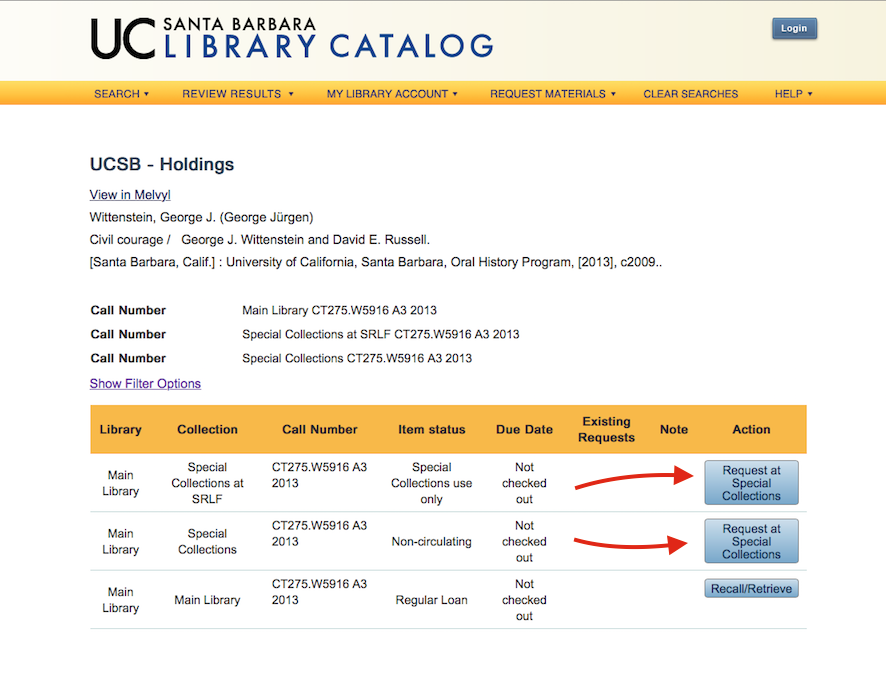
Limitations and Hurdles
The Aleph web template system is not flexible. One template file is used repeatedly for each row of items. There is no way to change the values of Aleph’s server side variables selectively.
Any dynamic manipulations we want to make will have to be done using Javascript after the server side rendering is done and the browser has loaded the page.
In order to Pre-Fill the AEON form we need to query Aleph for additional item information not displayed on the page.
- doc-number
- collection
- call-no
- description
- author
- year
- imprint
- title
- barcode
- material
That information is not normally available on the page but it can be retrieved via Aleph’s Restful API.
We thought Great we’ll use jQuery’s ajax to get the needed info from Aleph’s restful APIs. But guess what… That won’t work. You can not query the Aleph API’s directly using Javascript because the API is served out on another port. The API server, JBOSS, is not answering HTTP requests on Port 80. And Javascript has a strict security same origin policy so it can not make a call out to another server or another port. We tried to get around the same origin policy by enabling CORS (Cross Origin Resource Sharing) on JBoss. Aleph was bundled with JBoss version 3.2.4 which came out in 2004. We later updated it to version 5.0. But we were still not able to configure CORS with JBoss. It seemed we were at a dead end.
So… what if we could use AJAX to call to a script which would turn around and talk to the JBoss server and relay the result back to the browser to be handled by our Javascript. That will work! Provided you have a way to enable such a script. We didn’t. Aleph runs its own version of Apache which is compiled and configured by Exlibris. We have run it for years without altering it. Well now we needed more so we decided to enable PHP. We could have used some other server side scripting system such as Perl, Python, Ruby or a CGI script written in any number of languages. But we have experience and knowledge of PHP and it is the most common scripting system coupled with Apache on unix. Most commonly PHP runs as an Apache module. But we had trouble getting it to work that way due mostly to the rather old version of Apache which was bundled with Aleph. We experimented with several ways to get PHP working and finally suceeded using PHP-FPM (PHP FastCGI Process Manager). This allowed us to run a modern version of PHP (v5.6.7) without recompiling Apache or changing the Apache configuration much.
Checklist of things to enable, configure and get working properly:
- JBoss to power Aleph APIs. This is part of Aleph. see: Aleph API Documentation
- PHP-FPM
How to install and configure PHP-FPM on your Red Hat Enterprise Linux (RHEL) Aleph Server.
- Install REMI repo using rpm command.
rpm -i http://rpms.famillecollet.com/enterprise/remi-release-5.rpm
- Install php-fpm
yum --enablerepo=remi,remi-php56 install php-fpm
- Install php command line interface (cli)
yum --enablerepo=remi,remi-php56 install php-cli
- start the service
service php-fpm start
- enable service
chkconfig php-fpm on
- create php.cgi
vi alephe/apache/cgi-bin/php.cgi
#!/bin/bash
PHP_CGI=/usr/bin/php-cgi
exec $PHP_CGI
- set ownership and permissions on the cgi just created.
chown aleph:exlibris alephe/apache/cgi-bin/php.cgi
chmod +x alephe/apache/cgi-bin/php.cgi
- Configure Apache for php-fpm by adding the following lines to:
alephe/apache/conf/httpd.conf
AddHandler php5-fastcgi .php
Action php5-fastcgi  /cgi-bin/php.cgi
- restart Apache
Create a php script to test if PHP is working or not. This is our typical test script. We put ours in: alephe/apache/htdocs/test.php
<?php
phpinfo();
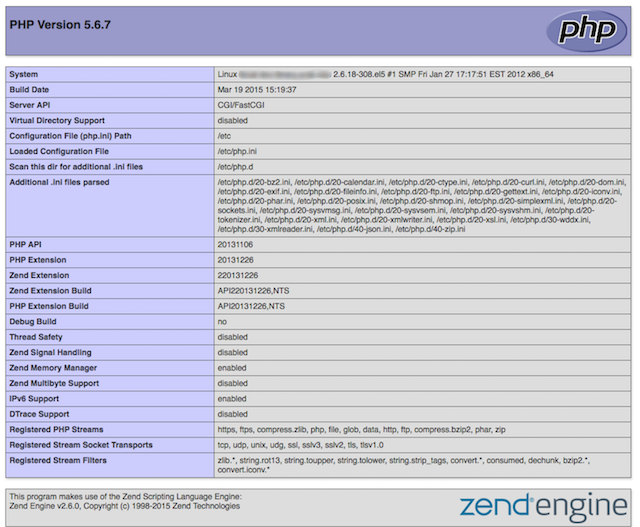
You can also see if PHP is working by inspecting the normally invisible HTTP headers. Ours looks like:
HTTP/1.1 200 OK
Date: Wed, 15 Apr 2015 21:28:40 GMT
Server: Apache/2.2.27 (Unix) mod_ssl/2.2.27 OpenSSL/0.9.8za mod_perl/2.0.5 Perl/v5.8.9
X-Powered-By: PHP/5.6.7
Pragma: no-cache
Expires: Fri, 01 Jan 2000 00:00:00 GMT
Cache-Control: no-cache, must-revalidate
Content-Type: text/html; charset=UTF-8
Notice that line 4 above lists PHP. If you don’t have PHP properly installed and configured you won’t see that line. Note: Some servers are cautiously configured to supress such HTTP headers in which case the test script is a better indicator.
Once we had PHP enabled and working on our Aleph server a world of possibilities opened. We can now use AJAX and JSON to dynamically update our catalog’s web pages using data from all three Aleph APIs.
Enhancing the Aleph web interface (a.k.a. Web OPAC) is the next step. We’re using jQuery javascript framework but you could use another one. jQuery seems to be the most common and widely used one so we settled on it without much deliberation. We’re using the HTML5 Doctype declaration at the top of our pages:
<!DOCTYPE html>
and then we include the jQuery library and our custom functions in the <head> section of the html.
<script type="text/javascript" src="/js/jquery-1.11.1.min.js"></script>
<script type="text/javascript" src="/js/ucsb_library_functions.js"></script>
At the end of our page, just before the closing </body> tag we run some javascript functions that update the page.
<script type="text/javascript">
        <!--
        jQuery(document).ready(function() {
        	// functions to change page after the browser loads it.
            link_to_aeon();
        });
        //-->
</script>
The link_to_aeon() function is 120 lines long and is a bit complicated. I’ll try to summarize what it does. It looks at the holdings listed on a search results page. For items that are in our Special Collections department it makes an Ajax call to a PHP script which relays a request to the Aleph API. In this AJAX call it requests the needed fields from the item record
All these bits of info are put together to form an Open URL standards compliant query string which is what the Aeon system expects and understands. Most of the bits of item information are not available from the standard Aleph web OPAC or at least not on the holdings screen. When the user clicks the “Request from Special Collectins” button this complex URL query is sent to the Aeon system. Ultimately these bits of info are used by Special Collections staff to locate the item and deliver it into a researcher’s hands.
With jQuery, Ajax, PHP and the Aleph API we’ve successfully linked our aged ILS to Aeon effectively integrating the two systems. This provides a seamless experience for the researcher who finds something in our catalog that they need from our Special Collections department.
Next I’ll write up how we made use of the Aleph APIs to build a Faculty Driven Acquisitions feature into our Web OPAC.