
URLs with the type smb are not supported
After upgrading my Mac OS X from 10.10.5 Yosemite to El Capitain 10.11.4 I found that I could no longer connect to SMB or CIFS network shares.
The error that came up was:
There was a problem connecting to the server. URLs with the type smb are not supported.
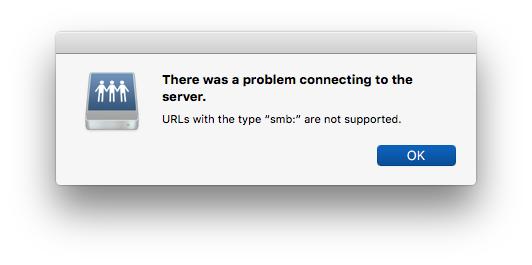
or
There was a problem connecting to the server. URLs with the type cifs are not supported.

I found that other El Capitain machines didn’t have any problem with CIFS or SMB. Finally I openend the console and tried to make my connection to the network drive. In console I found these helpful log entries:
2016-04-21 10:41:31.412 AM NetAuthSysAgent[7810]: Error loading /Library/Filesystems/NetFSPlugins/smb.bundle/Contents/MacOS/smb:  dlopen(/Library/Filesystems/NetFSPlugins/smb.bundle/Contents/MacOS/smb, 262):
	Library not loaded: /Library/Frameworks/Thursby.framework/Versions/A/Thursby
	Referenced from: /Library/Filesystems/NetFSPlugins/smb.bundle/Contents/MacOS/smb
	Reason: image not found

2016-04-21 10:41:31.412 AM NetAuthSysAgent[7810]: Cannot find function pointer CIFSURLMounterFactory for factory B5F1F630-567B-4E79-B76D-CE4328EED810 in CFBundle/CFPlugIn 0x7fc1f070e780 </Library/Filesystems/NetFSPlugins/smb.bundle> (bundle, not loaded)
2016-04-21 10:41:31.517 AM NetAuthAgent[7811]: inErrorInfo = {
    AuthType = Server;
    ErrorNumber = 45;
    ErrorType = 4;
    Scheme = smb;
}
I’m not sure what all that is about but I noticed that the file:
smb.bundle didn’t exist on my other working El Capitan machine.
After moving it aside everything worked again.
This is what solved it for me:
sudo mv /Library/Filesystems/NetFSPlugins/smb.bundle ~/Desktop/
One perhaps relevant point… Prior to the upgrade I had Thursby Software’s Dave software installed. It got uninstalled during the OS upgrade as part of the new Systems Integrity Protection (SIP) or Gatekeeper in El Capitan.